Professor Henry Jones: Well, he who finds the Grail must face the final challenge.
Indiana Jones: What final challenge?
Professor Henry Jones: Three devices of such lethal cunning.
Indiana Jones: Booby traps?
Professor Henry Jones: Oh, yes. But I found the clues that will safely take us through them in the Chronicles of St. Anselm.
Indiana Jones: [pleased] Well, what are they?
[short pause as Henry tries to recall]
Indiana Jones: Can’t you remember?
Professor Henry Jones: I wrote them down in my diary so that I wouldn’t have to remember.
***
Recipe for living a good life in the shell:
Make sure it’s fast.
Make sure its history can grow nearly infinitely and you can fuzzy-search through it.
The first one–fast shells–we talked about last week, so this time, let’s talk about shell history.
On one of my machines the ~/.zsh_history file contains 26278 commands. Its oldest entry was recorded on April 25, 2019. When I hit Ctrl-r in ZSH fzf pops up and lets me fuzzy-search through all 26278 commands, through the last 5 years of my shell history. It’s glorious.
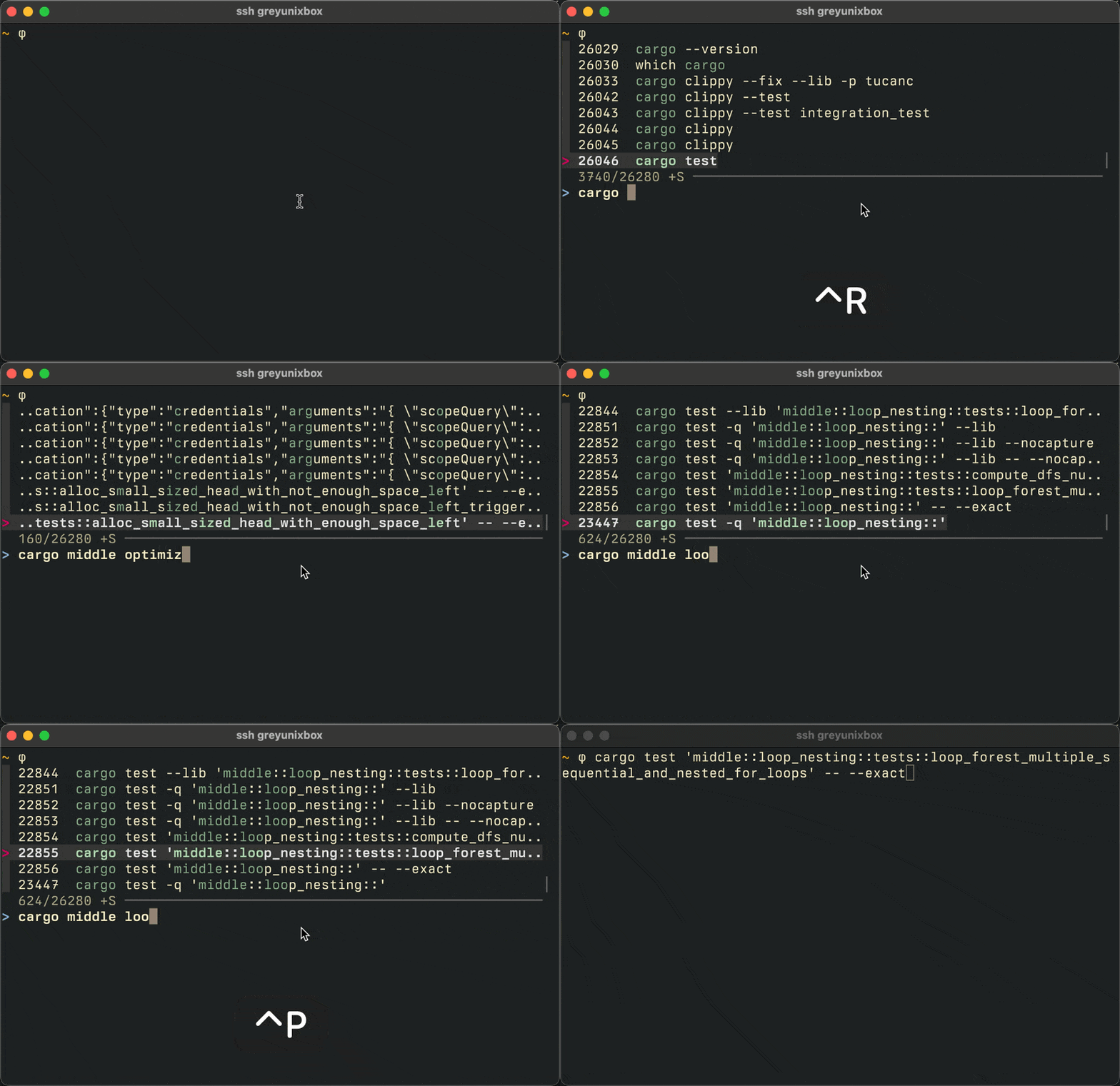
That one curl command with these four strange HTTP headers that I had to send to make sure I could talk to my local dev env correctly through the reverse-proxy – that’s in there, a few keystrokes and some hazy memories away. That one rsync that uses the correct SSH client binary on the other side and that preserves timestamps and permission – also in there. The ugly bastard of a command that combined git grep with find and 8 ugly incantations of AWK chained together – locked in there too. The test command I ran yesterday is as reachable as the one command with 12 && in it that I ran 3 years ago, all thanks to a long shell history file.
Truly: ~/.zsh_history is one of the most important files on my machine. I make use of it tens of times every day, whenever I hit Ctrl-r. If I wasn’t such a doofus it would contain even more than 26278 commands, because I’ve been keeping a long shell history for nearly a decade. But since I am such a doofus, I forgot to back it up (or deleted the backup too early) a few times and hence the ~/.zsh_history on the machine I’m typing this only contains 1034 commands.
Someone might say: “well, if the command was that important, why don’t you save it to a script?” And to that I say: look, man, if I knew in advance which command would turn out to be important, then we wouldn’t be here, because I’d already have ascended to the astral realm.
Also: why would I record it in a script if I can just configure my shell to keep track of all of those commands for me? It’s cheap, it’s fast, there’s essentially no downsides to it: the largest ~/.zsh_history I have is 2MB and I can fuzzy-search through it in milliseconds.
***
So, to repeat: your shell – ZSH, Bash, Fish, or others – can record every command you execute in it and I’m begging you to make sure it is configured to do that.
Make sure it keeps track of a lot of commands. So many commands that when you put the number in your rc-file you think: that’s ridiculous, why would I need to record that many commands? Double that number. As the next and final step you need to get a fuzzy-finder fuzzy-finder to search through it.
Here’s the ZSH configuration I used for many, many years:
##########
# HISTORY
##########

HISTFILE=$HOME/.zsh_history
HISTSIZE=50000
SAVEHIST=50000

# Immediately append to history file:
setopt INC_APPEND_HISTORY

# Record timestamp in history:
setopt EXTENDED_HISTORY

# Expire duplicate entries first when trimming history:
setopt HIST_EXPIRE_DUPS_FIRST

# Dont record an entry that was just recorded again:
setopt HIST_IGNORE_DUPS

# Delete old recorded entry if new entry is a duplicate:
setopt HIST_IGNORE_ALL_DUPS

# Do not display a line previously found:
setopt HIST_FIND_NO_DUPS

# Dont record an entry starting with a space:
setopt HIST_IGNORE_SPACE

# Dont write duplicate entries in the history file:
setopt HIST_SAVE_NO_DUPS

# Share history between all sessions:
setopt SHARE_HISTORY

# Execute commands using history (e.g.: using !$) immediatel:
unsetopt HIST_VERIFY
That was combined with fzf to fuzzy-search through the history on ctrl-r.
Configure your shell roughly like that and there you are: living the good shell life.
Or you can use Atuin, which I’ve been trying out for the last few weeks and have come to love. It’s a drop-in enhancement of your shell’s history functionality and not only gives you everything I described above – incredibly long shell history and fuzzy-search through it – but also syncing and backup (yup, need that) of shell history across multiple machines, filtering commands by machine, working-directory-specific history and probably 13 other things I forgot. It’s very nice. Highly recommend it.
Whatever you use: make sure your shell history is recorded, make sure your shell history can grow ridiculously long, and get a fuzzy-search for it.